
Nilufar Restaurant Expense Management System
نىلۇپەر ئاشخانا چىقىم خاتىرلەش سىستېمىسى
Project Resources
The complete Python source code, database file, configuration files, and more are available in the GitHub repository. An executable installer is also provided, which includes the full runtime environment and can be used without any extra configuration.
Project Overview
This is an expense management system I developed for my father's restaurant. Previously, cashiers had to record expenses in a handwritten ledger. Even after switching to Excel, manual data entry was still time-consuming and prone to errors. To enable cashiers to quickly input expense data and significantly reduce their workload, I developed this system using Python and PyQt6. The interface supports both Chinese and Uyghur. The system has been officially in use at my father's restaurant since July 2025. It not only makes daily expense entry much more convenient for the cashiers but also simplifies my dad's monthly reconciliation, accounting, and analysis tasks. Most importantly, I integrated DeepSeek AI to provide intelligent financial analysis, helping us better understand the restaurant's business performance.
Professional Restaurant Management
A complete financial management solution tailored to the specific needs of restaurant businesses.
AI-Powered Smart Analysis
Integrated with DeepSeek AI to provide professional financial analysis and business recommendations.
Bilingual Interface
Supports both Chinese and Uyghur languages to meet diverse user needs.
Data Visualization
Features rich chart displays and data export functionalities.
Technical Architecture
Development Framework
Data Processing
AI Integration
Document Processing
MVC Architecture Pattern
Adopts the Model-View-Controller architecture, separating the UI from business logic for a clean, maintainable, and scalable codebase.
Database Design
The SQLite database includes tables for users, categories, and expense records, supporting foreign key constraints and data integrity.
Multi-threading Design
The AI analysis feature is handled in a separate thread to prevent UI freezing, ensuring a responsive and smooth user experience.
Core Features Showcase
User Authentication
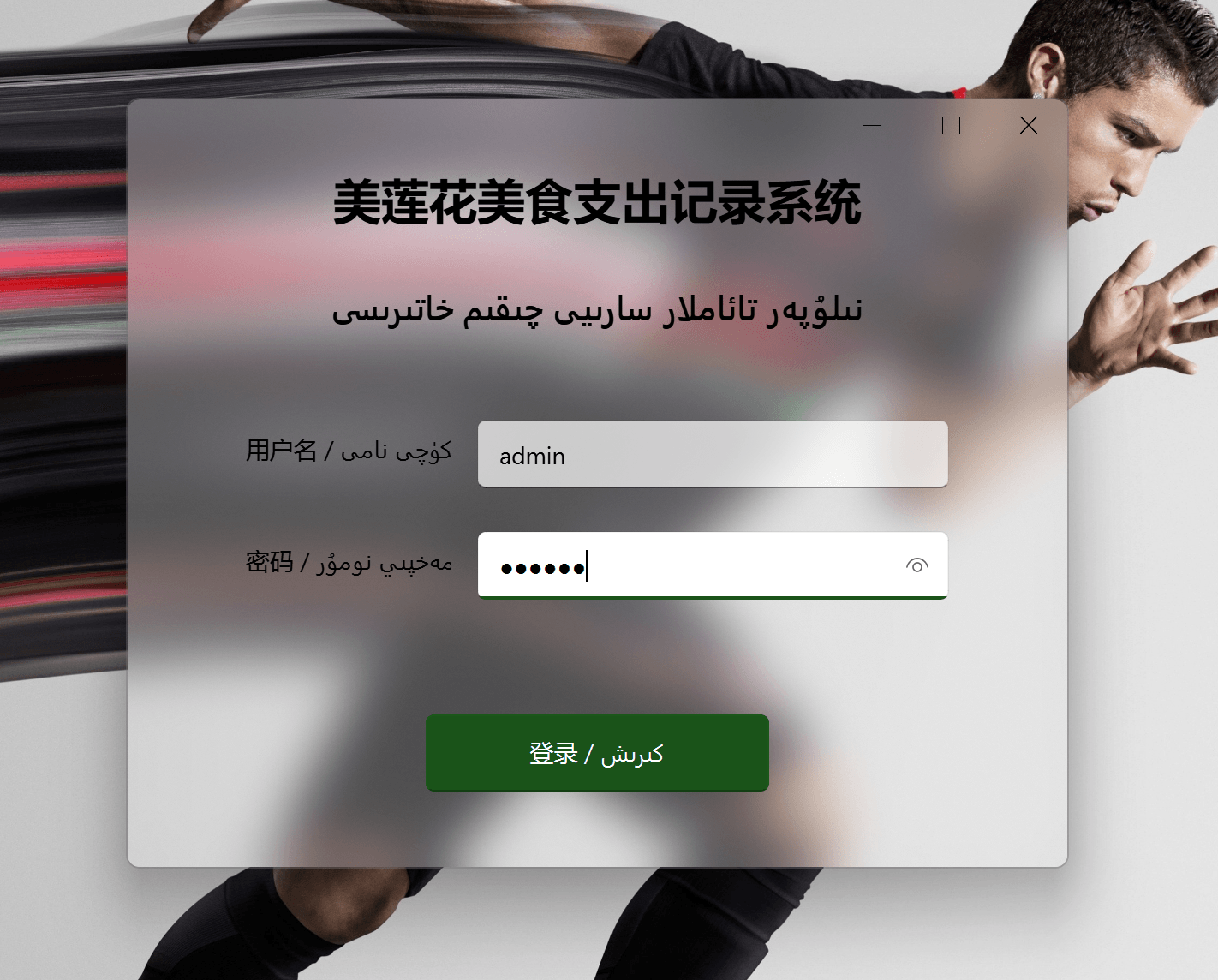
The system employs a secure login mechanism with username and password authentication. Passwords are encrypted and stored using SHA256. The login interface, designed with Fluent Design principles, supports bilingual display for an excellent user experience. Two user roles are configured: 'Admin' with full access, and 'Cashier' (a standard user) who can only enter and query expenses, without permissions to modify data or use the AI analysis, ensuring system security.
User Login Interface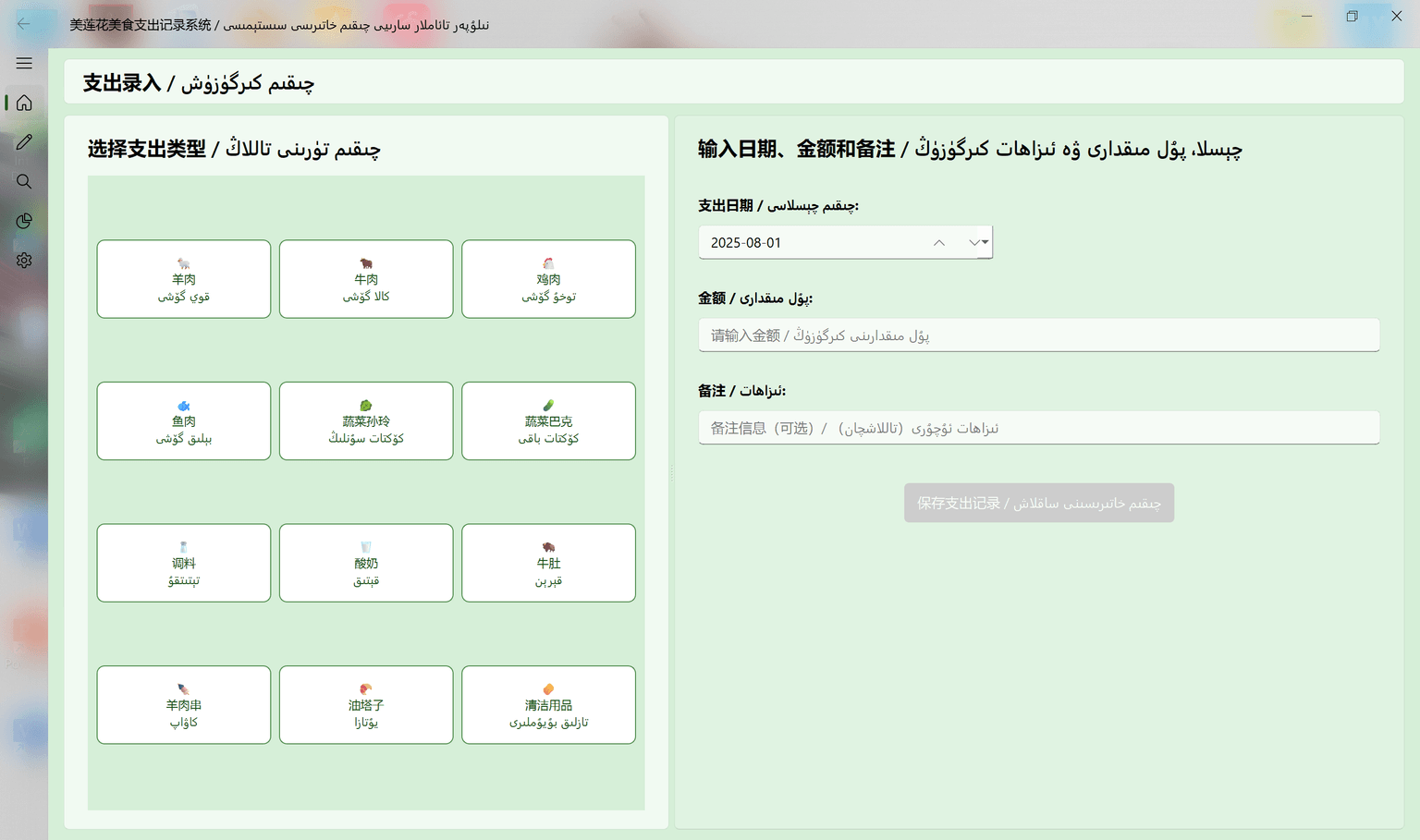 Expense Entry Interface
Expense Entry Management
The main interface provides an intuitive expense entry function, allowing for quick data input by category. It features a card-based layout with a grid of category buttons and supports custom category management. Every entry requires a confirmation dialog to ensure data accuracy.
Daily Record Management
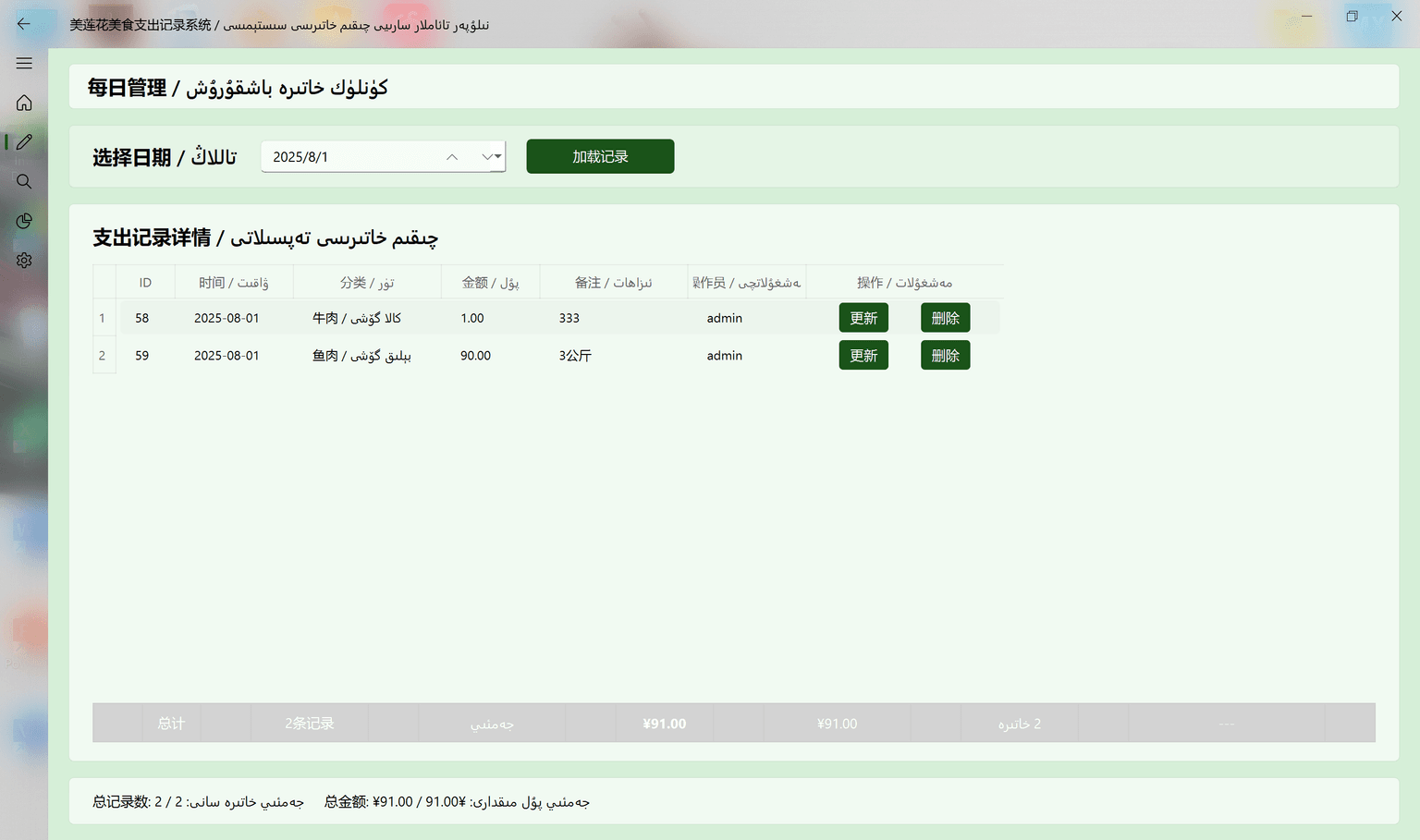
The system allows for viewing and managing the current day's expense records, including editing and deleting entries. The interface displays all of the day's expenses in a table, showing details like time, category, amount, and remarks.
 Daily Record Management Interface
 Data Query Interface
Data Query and Analysis
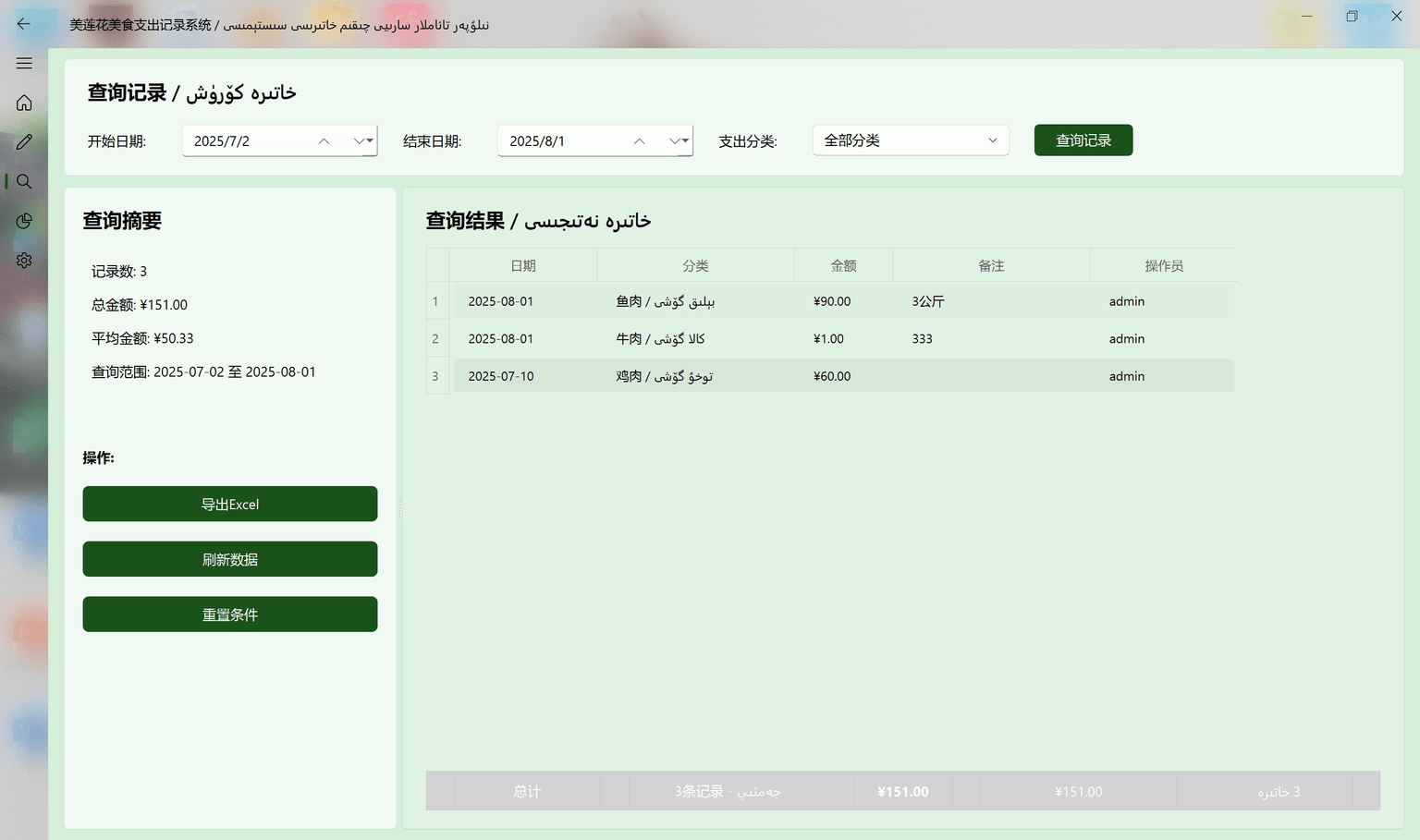
Offers powerful data query capabilities, allowing users to filter expense records by date range and category. It provides real-time statistics such as total records, total amount, and average amount, and supports data sorting and exporting to Excel. Note that only administrators can modify the amount and remarks of expense records; standard users can only query and export data.
Intelligent Report Analysis
The reporting center is a core feature, supporting both single-period analysis and dual-period comparative analysis. Single-period analysis can generate data visualizations like pie charts, while the dual-period comparison integrates the AI smart analysis function.
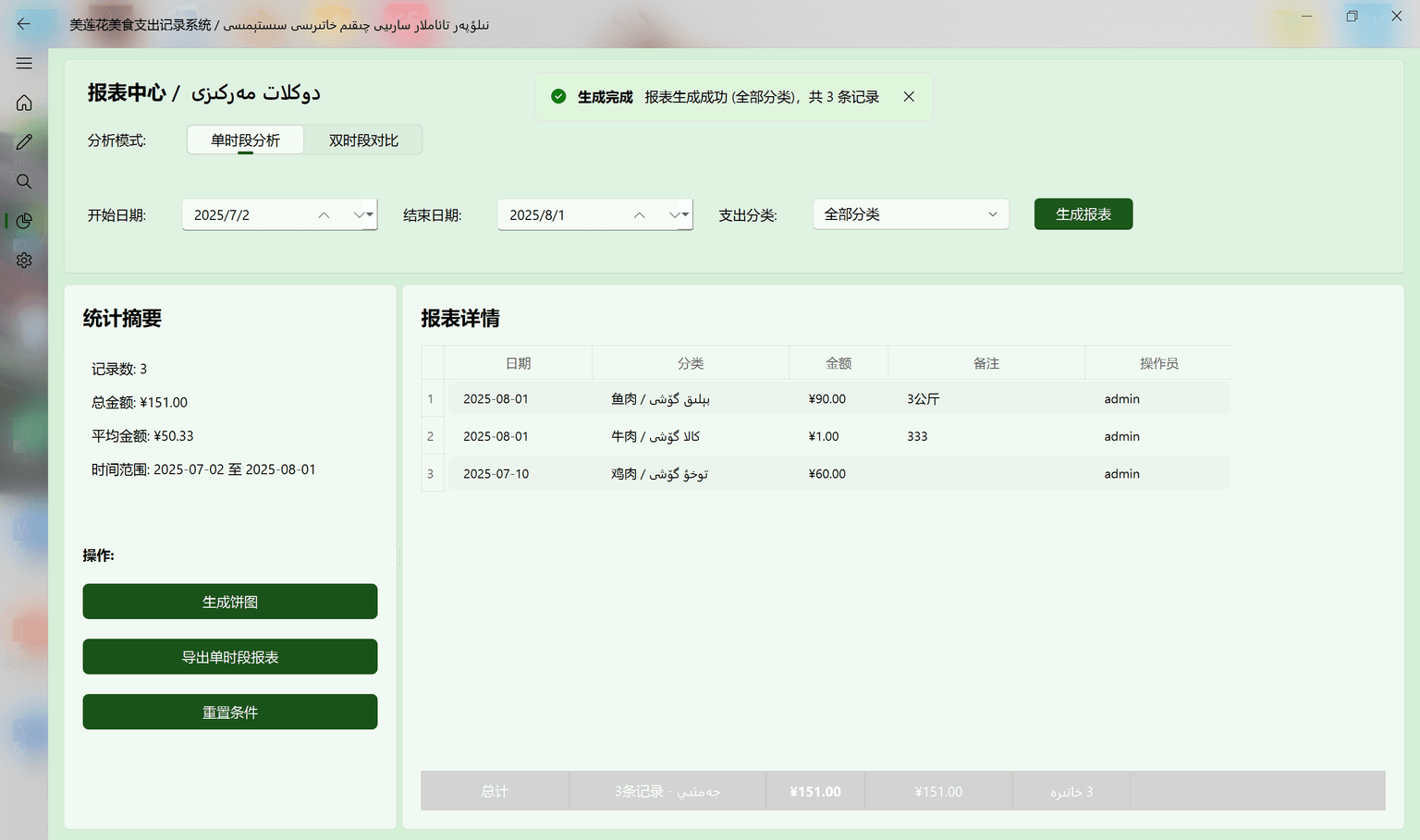 Single-Period Analysis Interface
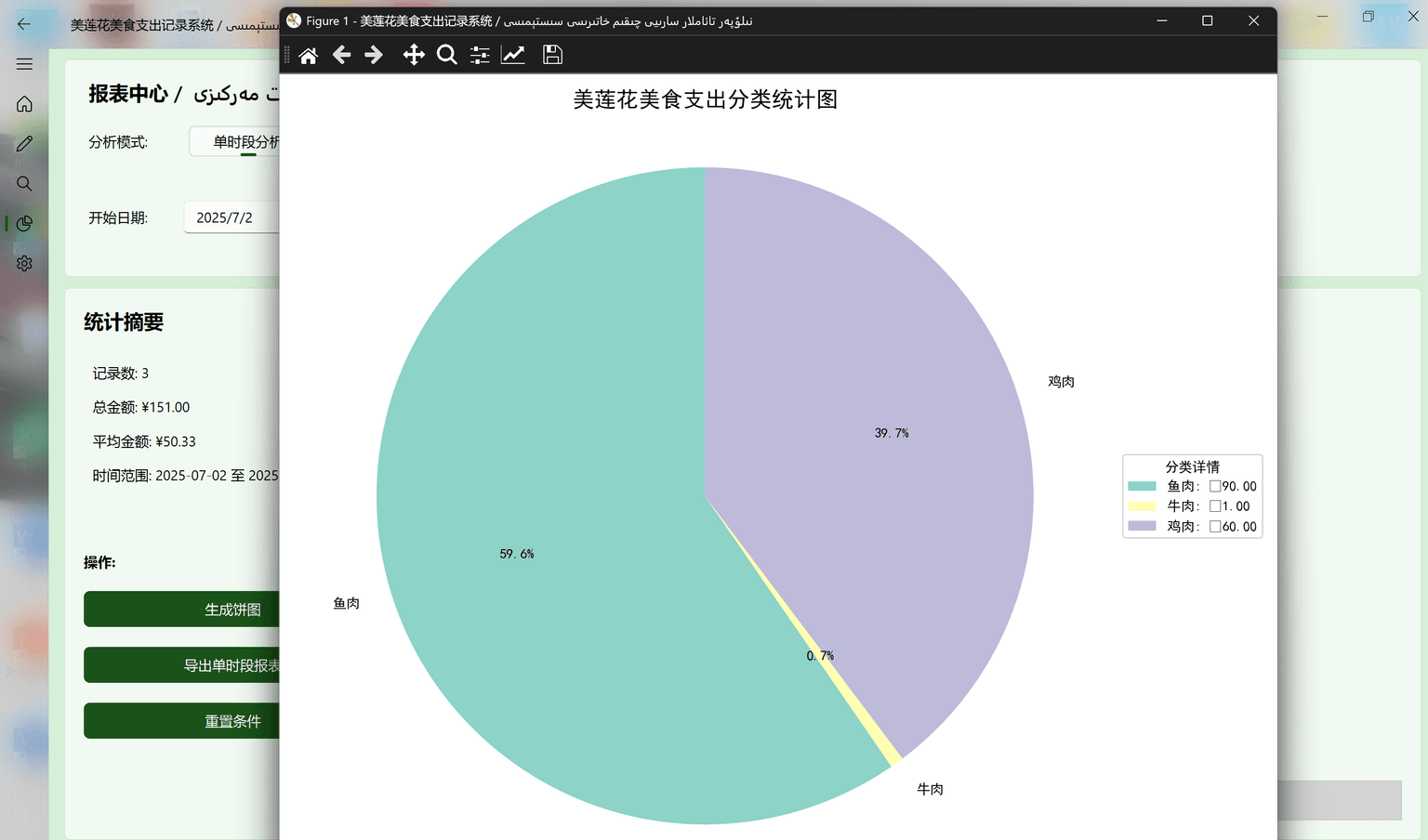 Data Visualization Pie Chart
AI-Powered Smart Analysis
The system integrates DeepSeek AI to offer professional financial analysis for the restaurant. In dual-period comparative analysis, the AI automatically generates an in-depth report, including spending trend analysis, anomaly detection, and business recommendations. The results are beautifully displayed in Markdown format and can be exported. For security, this feature is restricted to administrators.
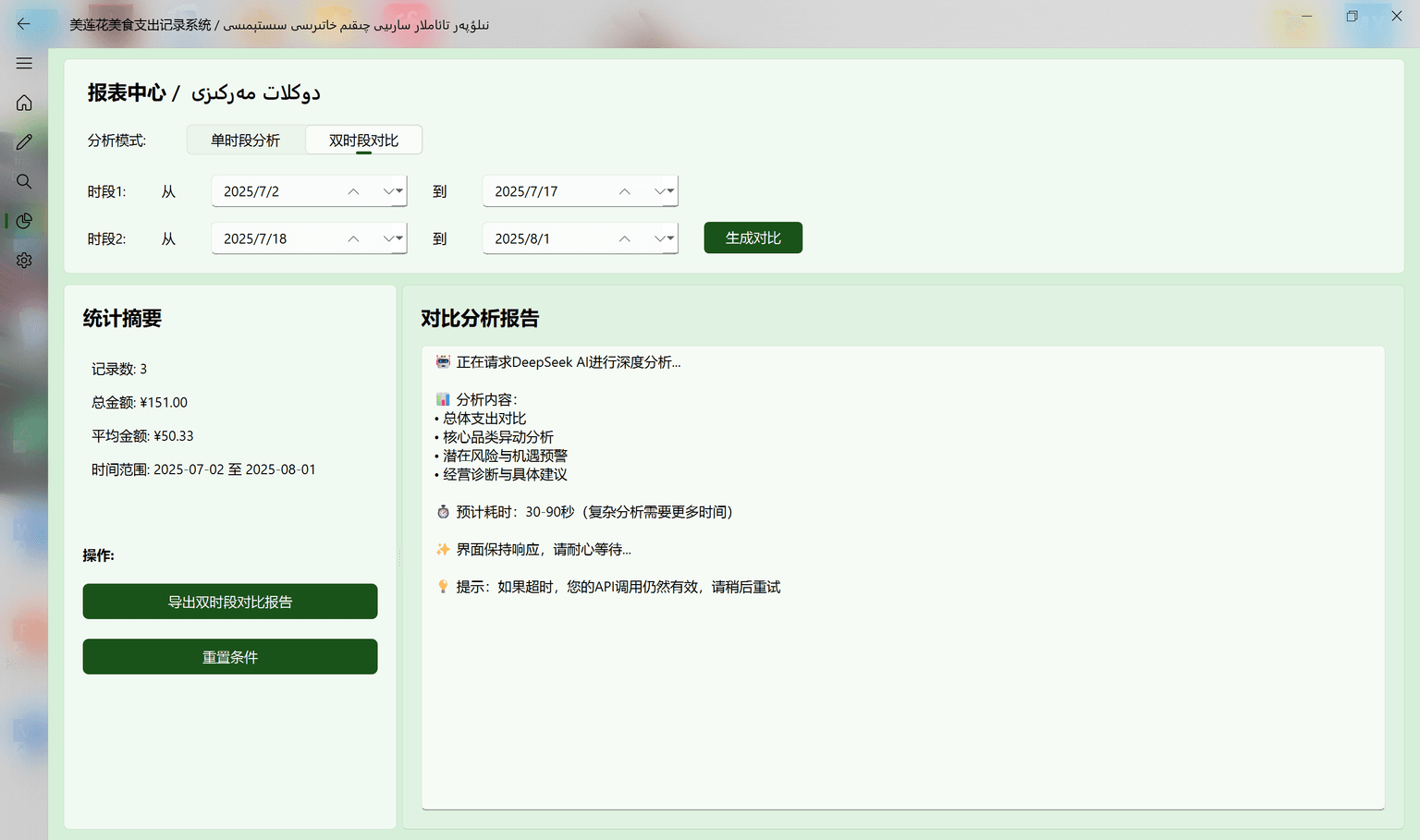 AI Analysis Interface
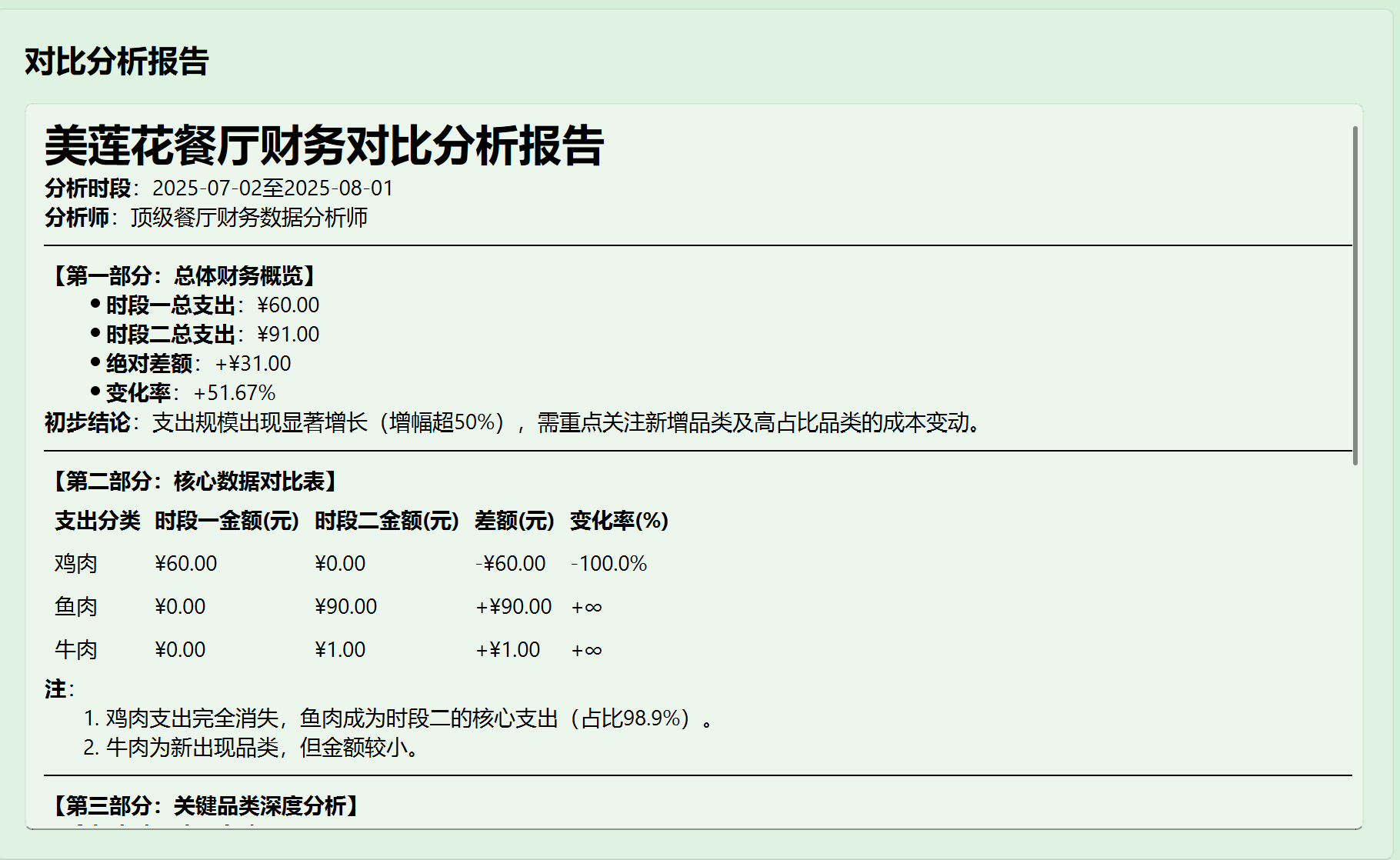 AI Analysis Results Display
System Settings Management
The system provides comprehensive settings management, including user and category management. It supports password changes, role management, and CRUD operations for expense categories to meet personalized needs.
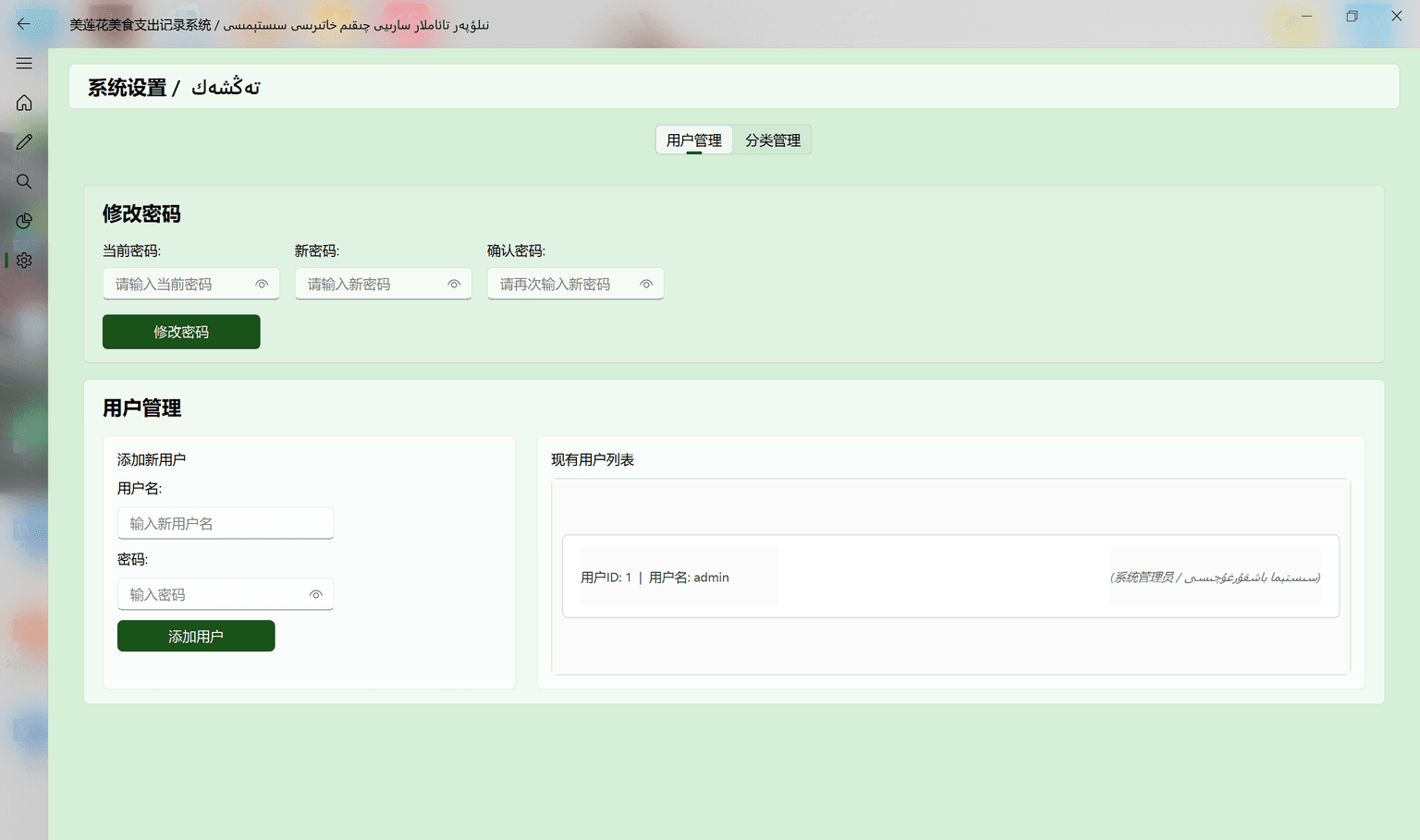 User Management Interface
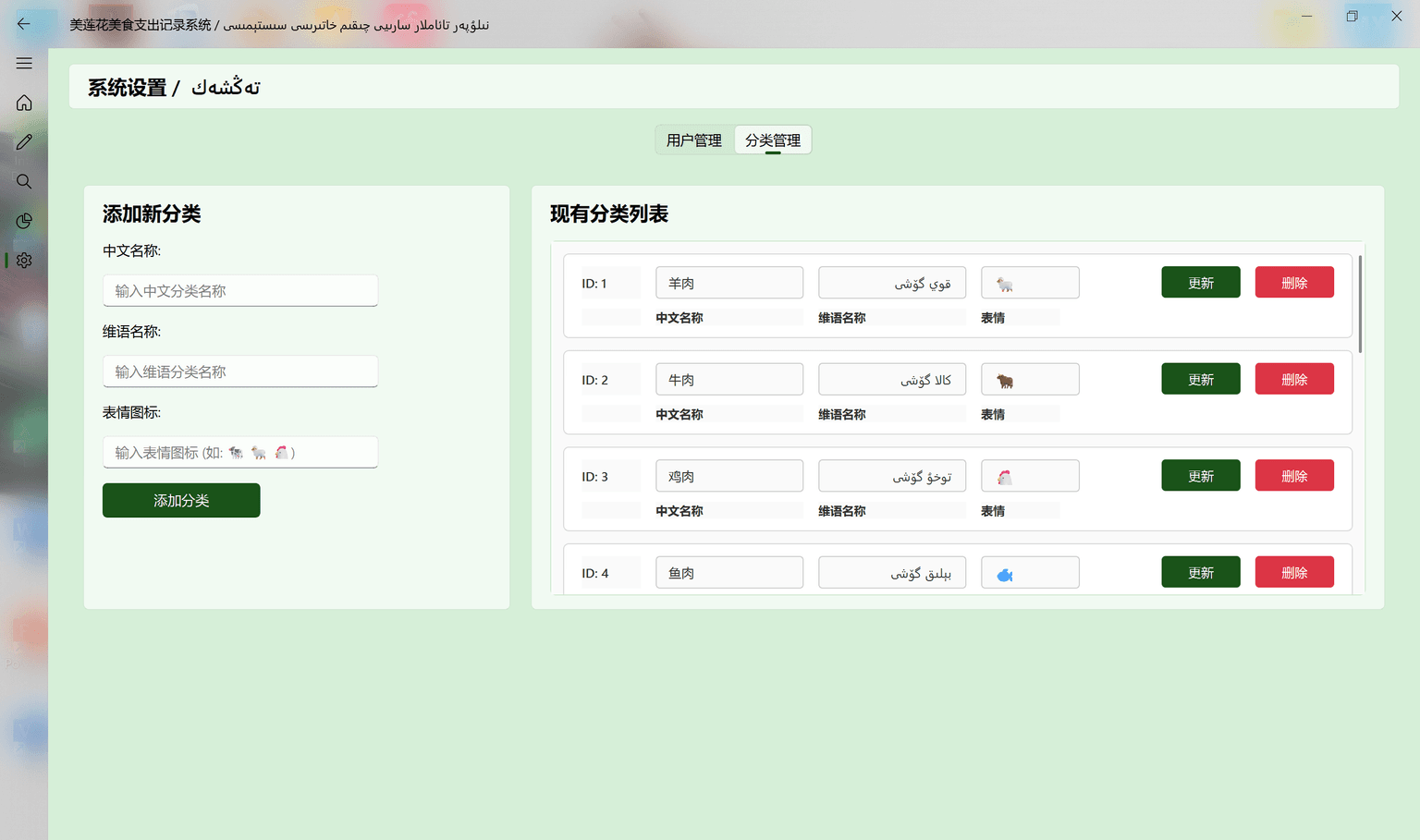 Category Management Interface
Complete System Demonstration
Full System Workflow Demo
Project Summary & Takeaways
Core Achievements
After over a month of real-world use, this system has genuinely solved practical problems for our restaurant. The cashier's efficiency has soared, moving from handwritten logs to one-click entries. My dad no longer needs to spend long hours organizing Excel sheets; the system's auto-generated reports and AI analysis give him a more intuitive understanding of the restaurant's financial health, enabling better business decisions.
Project Takeaways
Watching the cashier go from being unfamiliar with computers to proficiently using my system, and seeing my dad freed from late nights of accounting, has brought a sense of accomplishment no classroom project could ever provide. The true value of technology lies in solving real-world problems.
The bilingual interface wasn't a gimmick; it was a necessity for our Uyghur-speaking staff. The large buttons weren't just for aesthetics; they were designed because the cashier often wears gloves. True user experience design must stem from the actual needs of the user.
AI analysis wasn't just to show off a cool technology; it genuinely helps my dad analyze business data, identify unusual expenses, and know when to focus on cost control. Technology must serve practical business needs, not exist for its own sake.
Future Plans
There's still much room for improvement. I plan to add an inventory management feature to help the restaurant better control ingredient costs. I also want to incorporate sales data analysis to combine expense and revenue data, providing my dad with more comprehensive business insights. Most importantly, I hope to extend this system to other small restaurants, using technology to genuinely help more small business owners like my father.